
An ERP system should make running your business easier by helping employees find information, complete tasks, collaborate across departments, and keep operations moving.
But if your team struggles to navigate the system, complete everyday tasks, or access the information they need, it may be time to rethink your solution.
When it comes to selecting a new ERP, what should you look for when evaluating usability? Acumatica has put together a comprehensive checklist to use while researching ERP products. We’re taking a closer look at six important areas and why they are crucial to maximum usability.
1. Ease of Use and Navigation
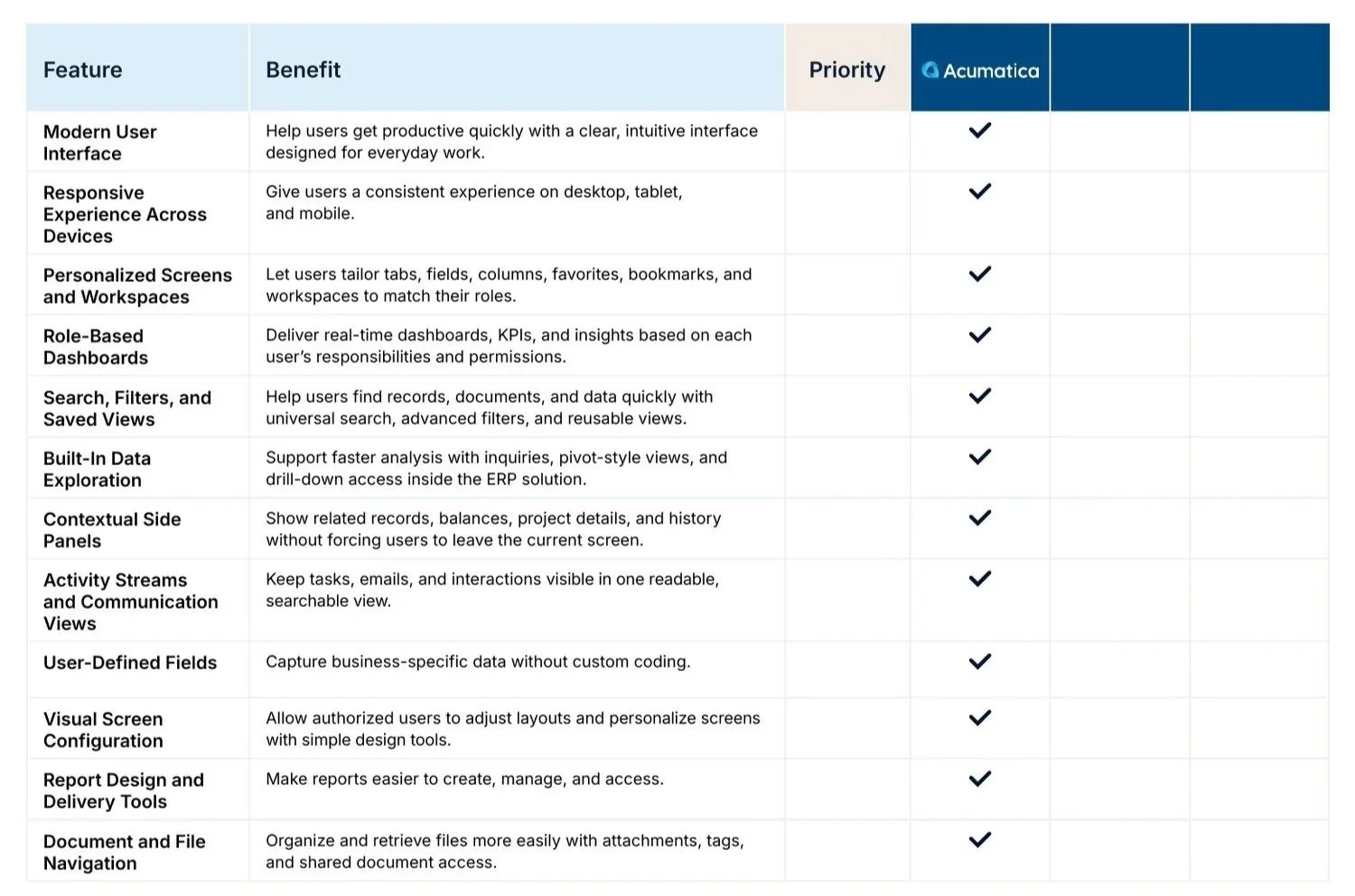
An ERP system should be intuitive so that employees can learn it and get their work done without unnecessary frustration.
Look for features that make everyday navigation easier, including:
Personalized workspaces: Allow employees to customize screens, dashboards, and shortcuts to fit their roles.
Search and saved views: Make it easier to locate records, documents, and information.
Role-based dashboards: Give employees visibility into the information and metrics most relevant to their responsibilities.
Mobile access: Provide a consistent experience across desktop, tablet, and mobile devices.
The goal is to reduce the time employees spend navigating the system and make important information easier to access.
See the full ‘Ease of Use and Navigation’ checklist below:
2. Ease of Task Completion
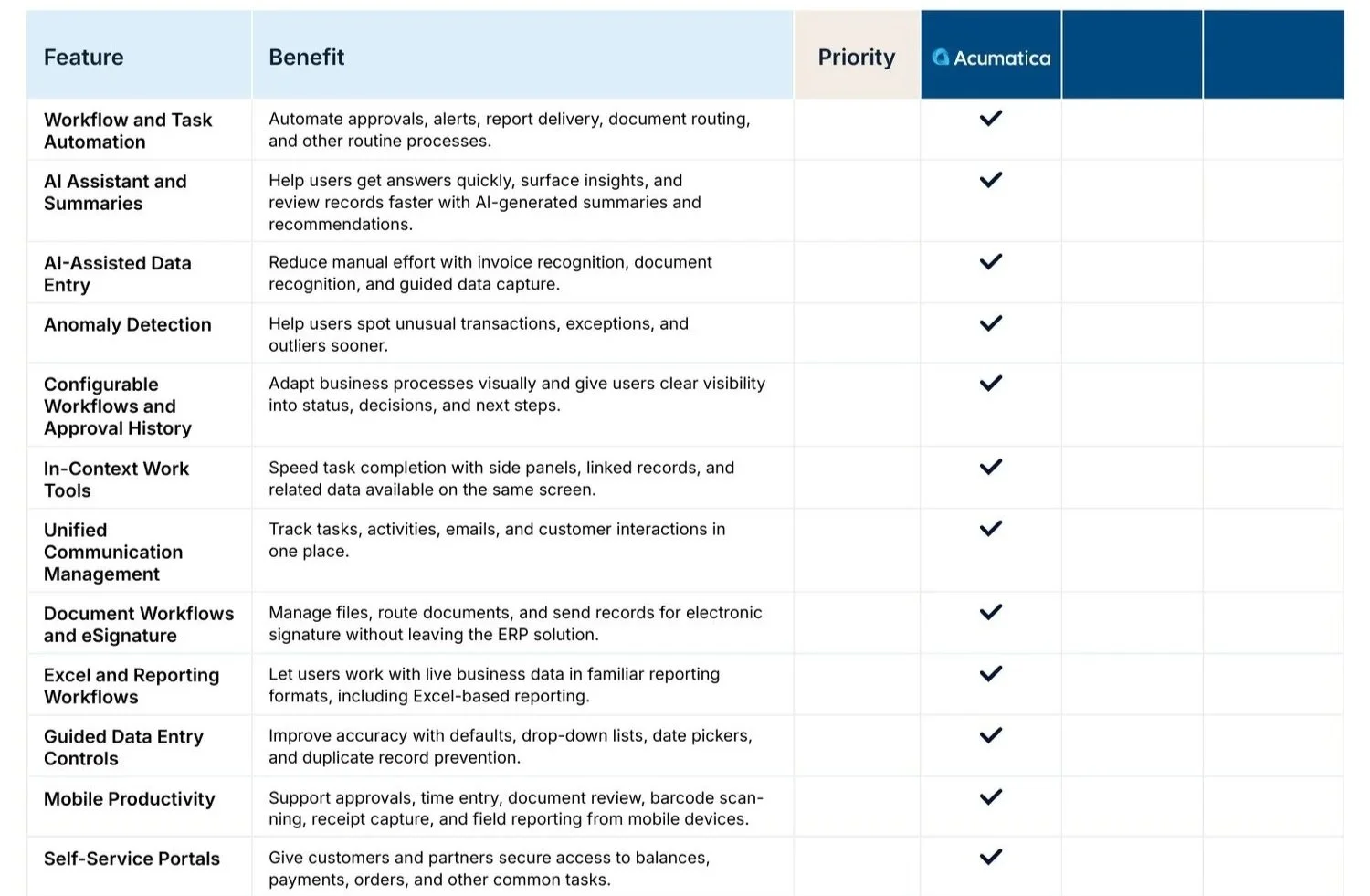
A good ERP system should help employees get work done with fewer manual steps.
Consider whether the software offers workflow automation, approval processes, document recognition, guided data entry, and tools that simplify everyday tasks.
AI capabilities are also becoming an important part of this conversation. Features like AI assistants, automated summaries, and anomaly detection can help employees find answers, review information, and identify potential issues faster.
Look for opportunities to reduce repetitive work and simplify common business processes.
See the full ‘Ease of Task Completion’ checklist below:
3. Ease of Administration
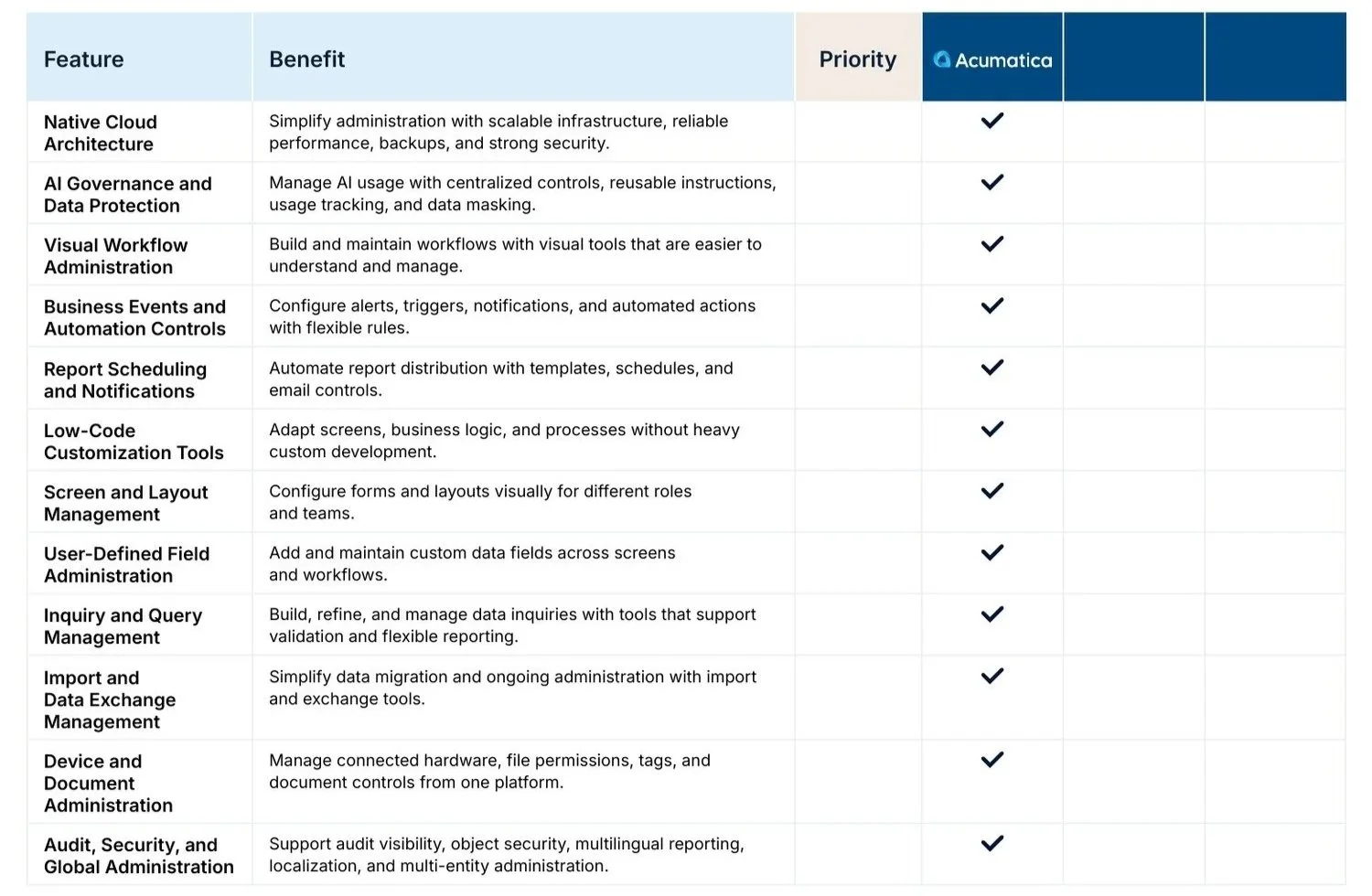
ERP usability isn't just about the employee experience. Administrators also need tools to manage and adapt the system as business needs change.
Consider whether the software makes it easy to:
Configure workflows and automate business events.
Customize screens, fields, and layouts.
Manage user permissions and security.
Create inquiries and reports.
Monitor and govern AI usage.
Low-code and visual configuration tools can also make it easier to adjust processes without relying on extensive custom development.
See the full ‘Ease of Administration’ checklist below:
4. Ease of Integration and Scalability
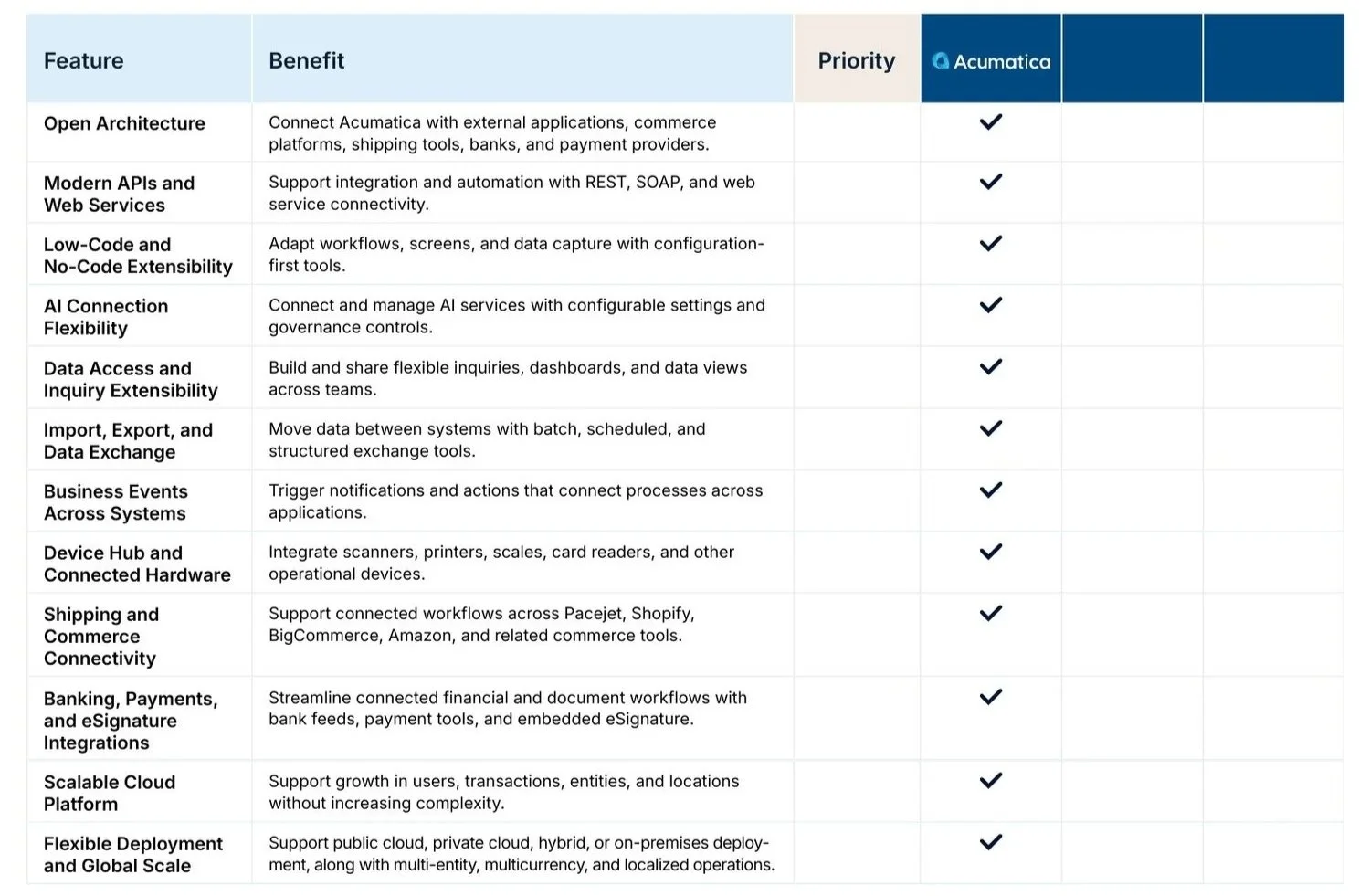
Your ERP doesn't operate in isolation so it needs to connect with the other systems and tools your business relies on.
When evaluating a solution, consider its ability to integrate with external applications, payment providers, eCommerce platforms, shipping tools, and connected hardware.
You should also think about the future of your business - Can the system support additional users, locations, entities, and transactions as your business grows?
An ERP platform should be flexible enough to adapt to changing needs without creating unnecessary complexity.
See the full ‘Ease of Integration and Scalability’ checklist below:
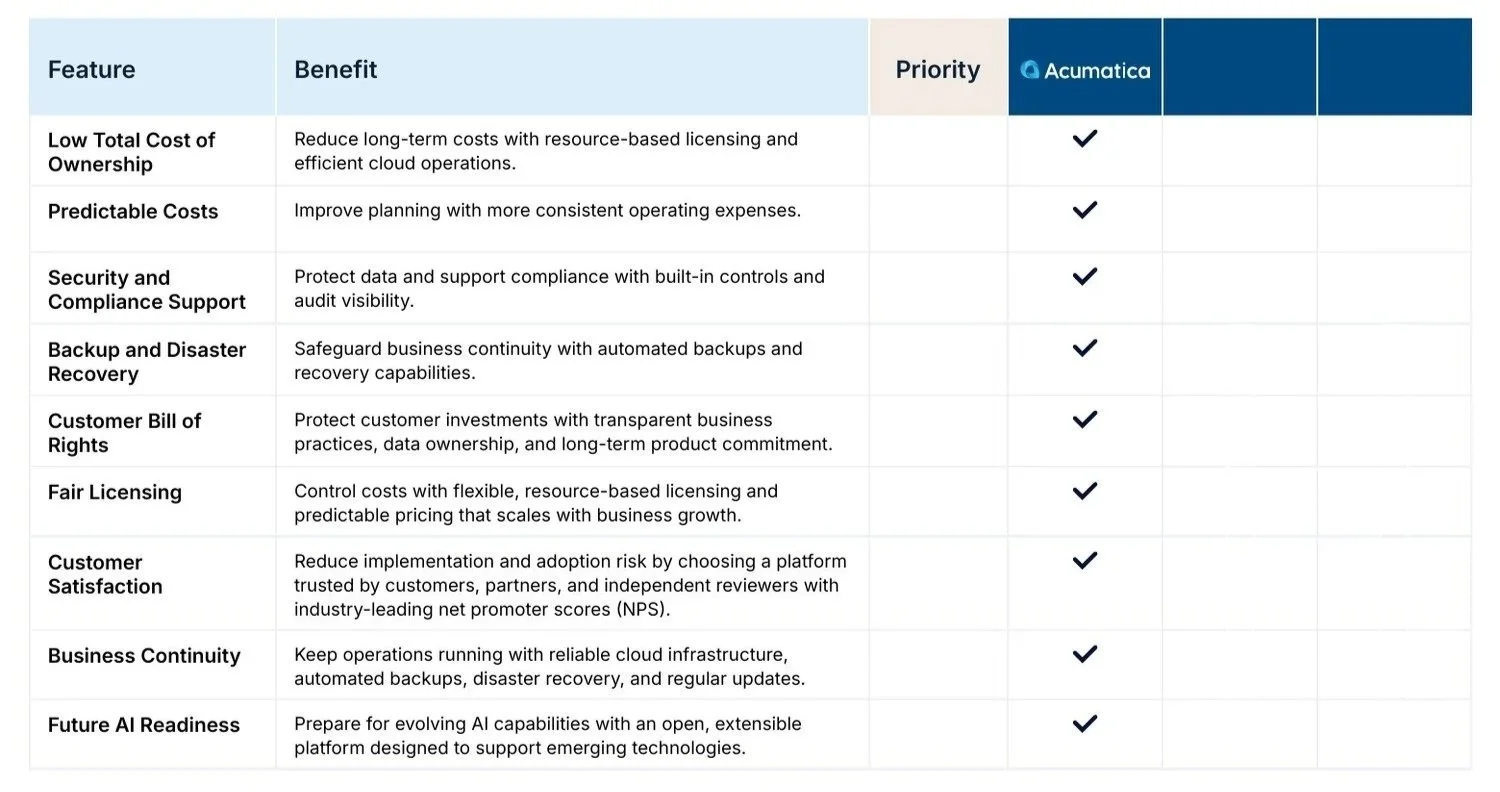
5. Value and Risk Mitigation
The cost of an ERP system goes beyond its initial purchase or implementation. It's important to consider the long-term investment and the risks associated with choosing the wrong solution.
Some areas to evaluate include:
Total cost of ownership: Understand licensing, implementation, maintenance, and ongoing operating costs.
Security and compliance: Look for built-in security controls, audit visibility, and data protection.
Business continuity: Consider backup, disaster recovery, and system reliability.
Future AI readiness: Consider whether the platform can support evolving AI capabilities and emerging technologies.
The right ERP should provide long-term value while helping protect your business and its data.
See the full ‘Value and Risk Mitigation’ checklist below:
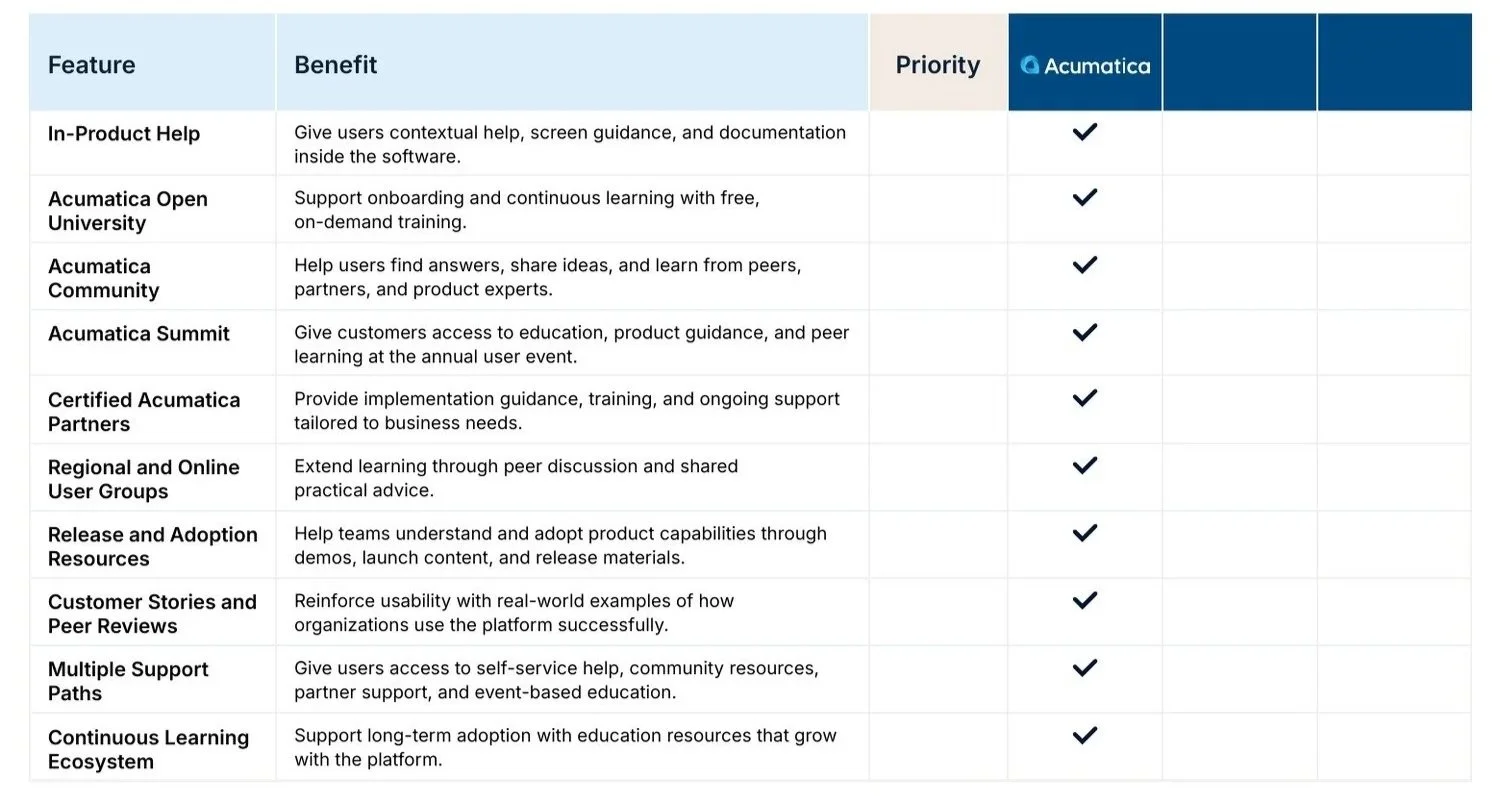
6. User Education and Support
Even an intuitive ERP system requires training and ongoing support.
Employees need access to resources that help them learn the software, understand new features, and get answers when questions arise.
Look for vendors that provide in-product help, training resources, user communities, and access to knowledgeable implementation partners.
Ongoing education can improve adoption and help your team get more value from the system over time.
See the full ‘User Education and Support’ checklist below:
Choosing an ERP That Works for Your Business
ERP usability is about easily your employees can use it to complete tasks, access information, and keep business operations moving.
When comparing ERP solutions, consider all six areas we have discussed - not just the features listed on a product page. The right system should support your team's current needs while providing the flexibility to grow and adapt.
Considering a new ERP system? Our team can help you evaluate your options and determine what to look for in a solution that fits your business.
Get the ERP Usability Evaluation Checklist
Comparing ERP solutions can be overwhelming. Acumatica's ERP Usability Evaluation Checklist provides a practical way to compare vendors across six important categories.
Download the checklist to review the features and capabilities that matter most and use it as a starting point when evaluating your next ERP system.
